Understanding Hyundai Tucson dashboard symbols and meanings starts with three details: the shape of the light, its colour and the message beside it. A red oil can calls for an immediate safe stop; a green indicator usually confirms that a feature is operating. A flashing light can mean either active assistance or a fault, depending on the symbol.
In this illustrated guide, we explain common Hyundai Tucson warning lights, what each one means and what to do next. We cover petrol, diesel, Hybrid and Plug-in Hybrid models, including equipment found across different Tucson generations. Your vehicle will not have every feature shown here.
The images are representative recognition aids. Some are monochrome; actual colours, artwork and messages vary with model year, market and instrument cluster. Use the description and your own display together, and follow the handbook supplied for your particular Tucson.
Potentially serious problem, such as oil pressure, overheating or braking
Read the message and stop safely when instructed.
Amber or yellow
Fault, unavailable assistance, low level or a disabled feature
Identify the symbol; inspect or arrange service as appropriate.
Green
A system is selected, ready or operating
Normally informational; keep monitoring traffic.
Blue
Usually high-beam headlights
Dip the beams when they could dazzle others.
White or grey
Standby status or operating conditions not met
Check the feature's specific meaning.
Colour is a starting point, not a diagnosis. A red seat-belt reminder needs a different response from a red oil-pressure warning. Likewise, an amber ESC light flashing on a slippery bend usually means the system is intervening.
Red Warning Lights That Need Immediate Attention
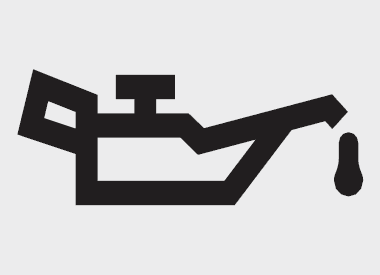
Engine Oil Pressure Warning Light
Action: Stop safely and switch off the engine.The oil-can symbol warns that engine oil pressure is too low. Continuing to run the engine can cause severe damage. Once safely parked, check the oil level using the handbook procedure and add the specified oil only if needed.A normal dipstick level does not prove that oil pressure is healthy. If the warning persists, the level is already correct or there are abnormal noises, arrange recovery instead of continuing your journey.
Parking Brake and Brake Fluid Warning Light
Action: Release the parking brake; investigate any remaining warning.A red circle with an exclamation mark, or a BRAKE display, can simply indicate an applied parking brake. If it stays on after release, low brake fluid or another brake-system problem may be involved.Stop safely. If there is a leak, abnormal pedal feel, reduced braking or a persistent warning, do not drive on. Adding fluid does not repair the reason it became low.
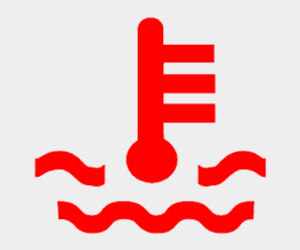
Engine Coolant Temperature Warning
Action: Stop safely and follow the overheating procedure.A thermometer above waves, a hot temperature gauge or an overheating message indicates excessive engine temperature. Turn off the air conditioning and move out of traffic safely. Do not continue driving an overheating vehicle.Follow your Tucson's cooling instructions. Never open a hot cooling-system cap. If steam or coolant is escaping, switch off and keep clear until it is safe; have the cause checked before continuing.
Battery and Charging System Warning Light
Action: Stop somewhere safe and arrange an electrical-system check.The battery-shaped light usually concerns the 12-volt charging system, rather than telling you how much charge remains. On conventional models, the alternator or its drive system may be involved. Hybrid electrical systems require different diagnosis.If the light stays on with the engine running or the hybrid system ready, avoid unnecessary electrical loads while reaching a safe stopping place. Replacing the battery alone may not solve the fault.
Airbag and SRS Warning Light
Action: Have the restraint system checked promptly.The seated person with a round airbag symbol relates to the Supplemental Restraint System. A light that remains after the startup check, or appears while driving, can indicate a fault affecting airbags or associated restraint equipment.Continue wearing seat belts, but do not assume every restraint will work normally. A separate passenger-airbag OFF indication can be an intentional status; check the occupant and handbook instructions.
Seat Belt Reminder
Action: Fasten the relevant seat belt before moving.The seated figure with a diagonal belt identifies an unfastened belt. Some clusters also show which occupied seat needs attention. A bag placed on a passenger seat may trigger an occupancy-related reminder.Check all occupants and secure loose luggage appropriately. If a reminder persists with the belt properly latched, have the buckle or detection system inspected instead of bypassing it.
Engine, Steering and Brake System Warning Symbols
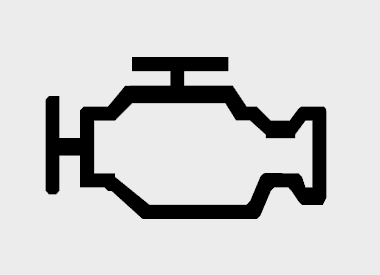
Check Engine Light or Malfunction Indicator Lamp
Action: Arrange diagnosis; stop if the vehicle runs badly.The amber engine outline means a fault has been detected in an engine, emissions or powertrain system. The light alone cannot identify the failed component. A steady lamp with normal operation still requires timely diagnosis.If it flashes, the engine shakes, power falls sharply or other serious warnings appear, ease off and stop safely. Flashing behaviour can have different causes on diesel models, so follow the exact message rather than assuming one universal fix.
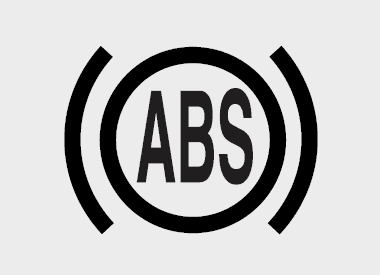
ABS Warning Light
Action: Allow more stopping distance and arrange inspection.An amber ABS light indicates a problem with the anti-lock braking system. Conventional hydraulic braking may remain available, but wheel-lock prevention during heavy braking may not operate normally.Avoid abrupt braking and slippery-road risks while arranging attention. If the red brake warning also illuminates, or the pedal feels abnormal, treat the situation as a more serious braking problem.
ABS and Red Brake Lights Together
Action: Stop safely and assess the brake warning urgently.This combination can indicate a fault involving Electronic Brake Force Distribution. Braking behaviour may become abnormal, particularly during sudden stops. It is more serious than an ABS warning appearing by itself.Do not test the brakes with a hard stop in traffic. If braking is affected or the red warning persists after releasing the parking brake, arrange recovery.
Electronic Parking Brake Warning Light
Action: Check the message and have the parking brake inspected.Amber EPB lettering indicates an electronic parking-brake warning. It differs from the normal red indication that the parking brake is applied. It can also appear alongside an ESC fault without proving a separate EPB failure.Confirm the vehicle is securely parked before leaving it. If the brake will not release, do not force the vehicle to move; seek assistance.
Electric Power Steering Warning Light
Action: Stop safely if steering assistance changes.A steering wheel with an exclamation mark relates to electric power steering, also described as EPS or MDPS. Steering may become unusually heavy or assistance may vary.Maintain a firm grip and avoid sudden manoeuvres while finding a safe place to stop. If normal control is compromised, arrange recovery. A persistent warning needs diagnosis even if the steering currently feels normal.
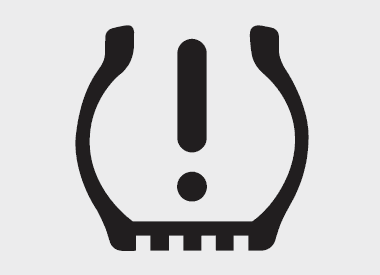
Tyre Pressure Warning Light and TPMS Fault
Action: Check the tyres and measure their pressures.The tyre-shaped outline with an exclamation mark usually means one or more tyres are significantly underinflated. Stop safely to inspect for damage, then use the cold pressure specified on the vehicle's placard.Flashing for roughly a minute before remaining on commonly indicates a TPMS malfunction. Do not inflate to the maximum printed on the tyre sidewall or assume every Tucson has the same reset procedure.
Master Warning Light: Triangle with an Exclamation Mark
Action: Read the accompanying dashboard message.The triangle is a general attention symbol. It can accompany several faults or unavailable features, including driver-assistance and lighting systems. It does not identify one particular failed part.We use the written message to decide the next step. A blocked-sensor notice calls for different checks from an urgent brake warning. Photograph the message only after parking safely.
Stability Control, AUTO HOLD and Everyday Indicators
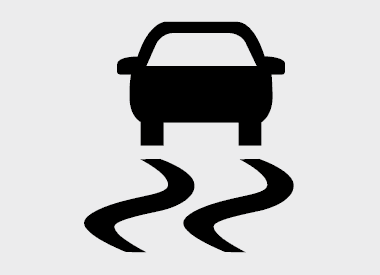
Electronic Stability Control Light
Action: Ease off when flashing; investigate a persistent light.The skidding-car symbol flashes when ESC is actively helping manage a loss of traction or stability. Reduce speed and use smooth steering and pedal inputs.If it remains illuminated after startup, the system may have a fault. Arrange inspection and do not rely on stability assistance to compensate for slippery conditions or excessive speed.
ESC OFF Indicator
Action: Check whether stability control was deliberately disabled.A skidding car above OFF normally confirms that some stability-control functions have been switched off. It does not automatically mean that the hardware has failed.For ordinary road driving, restore the normal setting using the vehicle's controls. If the indication cannot be cleared as described in the handbook, or appears with other warnings, have the system checked.
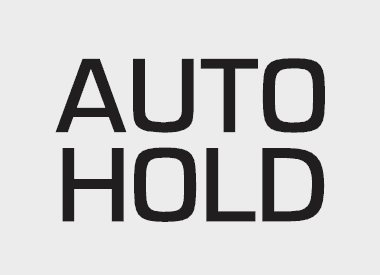
AUTO HOLD Indicator
Action: Read the colour before deciding whether there is a fault.White AUTO HOLD means the feature is available or in standby. Green means it is holding the vehicle stationary after braking. Yellow indicates a malfunction requiring inspection.AUTO HOLD does not replace the parking procedure. Before leaving the Tucson, select the appropriate parking position and apply the parking brake as instructed. Do not rely on the green display to secure an unattended vehicle.
Low Fuel Warning Light
Action: Refuel soon with the correct fuel.The fuel-pump symbol indicates that the fuel supply is running low. Remaining driving distance varies with traffic, gradients, temperature and driving style; there is no reliable universal mileage allowance.Hybrid and Plug-in Hybrid Tucsons still need petrol for their engines. Do not assume an available electric range makes it safe to ignore a low-fuel warning indefinitely.
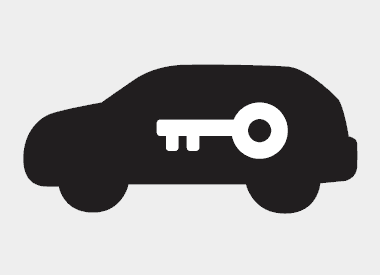
Immobilizer and Smart Key Indicator
Action: Check the key and the displayed starting instructions.A car-and-key symbol relates to key recognition and the immobilizer. Brief illumination before starting can be normal. Flashing or a key-not-detected message may indicate a recognition issue or system fault.Make sure the correct key is inside the vehicle, move it away from possible interference and follow the handbook's backup starting procedure if its battery is weak. Persistent trouble needs inspection.
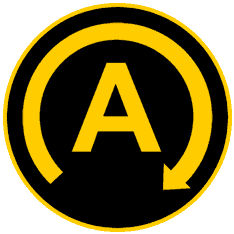
AUTO STOP and Idle Stop and Go Indicator
Action: Distinguish an automatic engine stop from a malfunction.An A surrounded by an arrow identifies the automatic stop/start function on equipped models. A normal operating indication can appear when the engine has stopped at a standstill to save fuel.Battery condition, engine temperature and climate-control demand can prevent operation. Colours and availability differ between versions. A persistent amber indication or fault message needs checking; Hybrid engine shutdown is not necessarily this same feature.
AWD and Downhill Driving Symbols
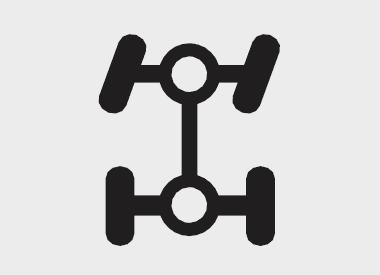
AWD or 4WD System Warning Light
Action: Reduce demands on the drivetrain and arrange inspection.An axle or drivetrain-shaped warning concerns the all-wheel-drive system on equipped Tucsons. A persistent fault light means the system needs checking; do not assume normal rear-wheel assistance remains available.Read any overheating or stop message and follow it. Avoid towing, difficult terrain or other heavy demands until the cause is understood. Front-wheel-drive versions will not have this system.
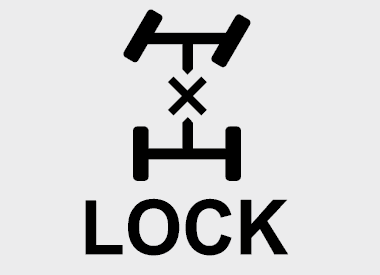
AWD LOCK Indicator
Action: Use the selected setting only as the handbook permits.The drivetrain symbol with LOCK confirms selection of the AWD locking function on applicable versions. It is normally a status indicator, unlike an AWD fault light.Its operating limits depend on the model and vehicle speed. Do not assume the indication means a permanently locked mechanical differential or permission to use the setting continuously on dry, high-grip roads.
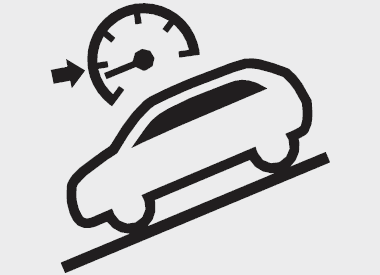
Downhill Brake Control Indicator
Action: Maintain control and check the indicator's colour.The vehicle-on-a-slope symbol identifies Downhill Brake Control. Green typically means the system is ready, and flashing green indicates active downhill speed control. Yellow signals a fault.Continue steering and monitoring the descent yourself. If the system warns of a malfunction, stop relying on it and arrange inspection. DBC cannot make every steep or slippery slope safe to descend.
Driver Assistance, Lighting and Weather Symbols
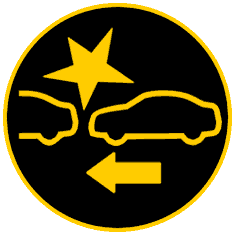
Forward Safety and Collision-Avoidance Warning
Action: Respond to traffic immediately; check persistent amber warnings.A collision-related car symbol concerns Forward Collision-Avoidance Assist. A red flashing alert can accompany a collision warning or intervention, requiring immediate attention to the road.An amber indication can mean the feature is disabled, unavailable or faulty. Read the message. If a sensor-blocked notice appears, clean accessible sensor areas when safely parked; persistent warnings need inspection.
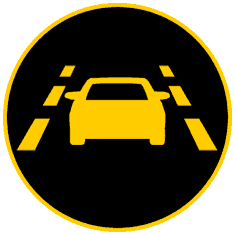
Lane Safety and Lane Keeping Assist Indicator
Action: Keep steering and check the system's current status.A vehicle between lane markings relates to lane assistance. Depending on the cluster, grey means operating conditions are not met, green indicates readiness and flashing green can show intervention. Yellow may indicate a disabled, unavailable or faulty function.Poor markings and bad weather can limit detection. These systems assist the driver; they do not remove the need to watch the road and maintain lane position.
Driver Attention Warning and Coffee Cup Symbol
Action: Take a safe break when prompted.The cup symbol or break recommendation suggests that the driving pattern may indicate reduced attention. Find a suitable place to stop and rest. Do not wait for the reminder if you already feel tired.On some clusters, a persistent yellow attention indicator can instead relate to a disabled or faulty function. Read the accompanying words to distinguish a rest suggestion from a system warning.
LED Headlight or Exterior Lighting Warning
Action: Check your lights and arrange repair.A lamp-related warning with an exclamation mark indicates a lighting-system problem. Depending on equipment, the message may identify an LED headlight or a related component.Check whether the lights provide adequate visibility before driving at night or in poor weather. Switching the headlights off and on is not a dependable repair for a recurring warning.
Icy Road Warning: Snowflake Symbol
Action: Slow down and increase your following distance.The snowflake warns that outside temperatures could allow icy road conditions. On many Tucsons it appears at approximately 4°C or 40°F, sometimes with a chime or flashing temperature display.It is a caution, not confirmation that ice is present everywhere. Bridges, shaded bends and exposed roads can be slippery even when nearby surfaces look clear.
High-Beam Indicator
Action: Dip the headlights when necessary.The blue headlamp with straight horizontal rays means high beams are on. It is normally a lighting status rather than a fault.Switch to dipped beams when approaching or following other traffic, or whenever high beams reduce visibility through fog, rain or reflected light.
High Beam Assist Indicator
Action: Continue monitoring the headlights yourself.A headlamp with A or AUTO identifies High Beam Assist on equipped models. The indication shows the automatic high-beam function is selected or available; it does not always mean high beams are currently illuminated.Check the separate blue high-beam light for their actual status. Override the automatic function if it fails to respond appropriately to traffic or lighting conditions.
Rear Fog Light Indicator
Action: Use it only when visibility requires it.The amber fog-lamp symbol confirms that the rear fog light is switched on, where fitted. It helps following traffic see the vehicle in seriously reduced visibility.Switch it off when conditions improve because its brightness can dazzle drivers behind. Its amber colour does not, by itself, indicate a lighting fault.
Turn Signal and Hazard Indicators
Action: Check that the intended signals are operating.Green arrows flash with the turn signals. Both sides flash when the hazard warning lights are operating.An unusually fast flashing rate can indicate a problem with a turn-signal lamp or its circuit. Check the exterior lamps when safely parked and arrange repair if any signal is missing or behaving abnormally.
Diesel and Exhaust-System Warning Lights
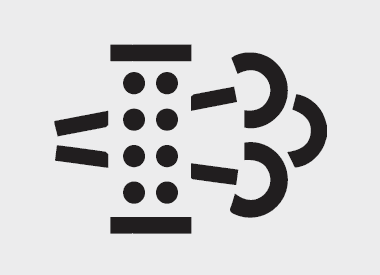
DPF or GPF Exhaust Filter Warning
Action: Follow the procedure for your exact engine.A filter with dots and exhaust-flow lines concerns a particulate filter. Diesel models use a DPF; certain petrol versions use a GPF. Soot accumulation or a related system problem may trigger the warning.An approved regeneration drive may be appropriate in specified conditions, but there is no single speed, engine speed or duration for every Tucson. If the warning flashes, persists or accompanies reduced power, arrange diagnosis rather than repeatedly trying to clear it by driving faster.
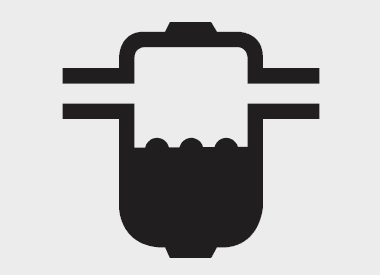
Water in Fuel Filter Warning
Action: Have the diesel fuel filter checked promptly.The filter-shaped symbol with a fluid line warns of water collected in the diesel fuel filter. Continued use can damage sensitive fuel-injection components.Arrange professional inspection and draining as specified for your vehicle. Refuelling or adding an additive is not a reliable substitute for removing the water and investigating why the warning appeared.
Diesel Glow Plug Indicator
Action: Wait for preheating to finish before starting as instructed.The coiled-wire symbol shows diesel engine preheating. Brief illumination during a cold start is normal, and its duration depends on temperature and other conditions.If the coil remains illuminated or flashes after the engine warms up or while driving, have the preheating or engine-control system checked. It should not be treated as a normal warm-up reminder throughout a journey.
SCR and Urea or AdBlue Warning
Action: Read the message and replenish the correct fluid when required.On diesel Tucsons equipped with selective catalytic reduction, this warning can indicate a low urea-solution level. Refill the specified fluid in its dedicated tank; never pour it into the fuel tank.A system-fault message or remaining-start countdown requires attention even if fluid has been added. Follow the vehicle's instructions and arrange diagnosis if the warning persists.
Hyundai Tucson Hybrid and Plug-in Hybrid Symbols
READY Indicator
Action: Treat the vehicle as capable of moving.READY, or the corresponding readiness symbol on some displays, confirms that the hybrid system is on and the Tucson can be driven. The petrol engine may be silent at this point.Keep your foot on the brake when selecting a drive position. If readiness disappears unexpectedly or flashes with a warning, stop safely and seek advice instead of assuming the vehicle is simply resting in electric mode.
EV Mode Indicator
Action: No repair is needed for normal electric operation.EV indicates that the electric motor is propelling the vehicle under the applicable operating conditions. It can appear and disappear as a Hybrid or Plug-in Hybrid switches between power sources.The engine may start because of acceleration, battery condition, temperature or heating demand. A change in the EV indication alone does not establish that the hybrid system has a fault.
Hybrid System Service Warning
Action: Read the message and arrange qualified assistance.The hybrid service symbol, often a car with an exclamation mark, identifies a problem involving the hybrid control system or related components. It is different from a routine service-interval reminder.If the display says to check the hybrid system, stop safely and seek assistance before driving further. Follow any stop or do-not-start instruction and do not touch high-voltage components.
Regenerative Braking Warning
Action: Treat combined brake warnings as urgent.On Hybrid and Plug-in Hybrid models, an amber regenerative-brake warning can illuminate with the red brake warning when the braking system has a fault. Pedal operation and stopping distance may change.Reduce speed carefully and stop somewhere safe. If braking is abnormal, or a stop-and-check-brakes message appears, arrange recovery. Do not assume this is merely a temporary loss of energy recovery.
Charging Cable Connection Indicator
Action: Disconnect the charging cable before driving.The plug symbol on a Tucson Plug-in Hybrid indicates a connected charging cable. This can be a normal connection status; colour and display duration vary by model year, so do not apply a universal colour rule.If charging has stopped unexpectedly, read the charger or cable message. Check accessible connections for obvious damage without dismantling anything, and seek assistance if the problem repeats.
What to Do When Several Tucson Warning Lights Appear
We prioritise the most serious message and how the vehicle behaves. Red brake, oil-pressure, overheating or stop instructions take precedence over convenience-feature notices. Move to safety before reading menus or photographing the display.
Multiple warnings do not automatically mean multiple components failed. One electrical, sensor or communication problem can affect several systems. A weak 12-volt supply is one possibility, but it is not a diagnosis and should not be used to dismiss a brake or steering warning.
Record when the lights appeared, whether they flashed and any changes in braking, steering or engine performance. These details help a technician narrow the investigation. For braking, steering, airbag and hybrid faults, diagnostic equipment may need access beyond the basic engine fault codes.
Can You Reset Hyundai Tucson Warning Lights Yourself?
We recommend correcting the cause before clearing any warning. Adjusting tyre pressures, fastening a belt or restoring an intentionally disabled feature can remove the corresponding indication when the system recognises the change.
A service-interval reset is a separate task and should follow completed maintenance. Disconnecting the battery or erasing fault codes does not repair the underlying problem and may remove useful diagnostic information. Persistent warnings require diagnosis, even if they temporarily disappear after restarting.
Hyundai Tucson dashboard symbols are easier to understand when we combine the icon, colour, flashing pattern and written message. Separate normal feature indications from faults, and treat warnings affecting lubrication, cooling, braking or vehicle control with particular care.
Match this guide to your Tucson's model year and powertrain. When a warning persists or the car behaves abnormally, a proper diagnosis is more useful than guessing at a replacement part or repeatedly resetting the display.
Frequently Asked Questions
1. What does the triangle with an exclamation mark mean on a Hyundai Tucson?
It is the master warning light. It directs attention to a message about one or more vehicle systems. Read that message to identify the issue and urgency; the triangle alone does not mean that the engine, battery or another specific component has failed.
2. Can I drive my Hyundai Tucson with the check engine light on?
That depends on the warning and symptoms. A steady amber lamp with normal operation calls for prompt diagnosis. Flashing, rough running, major power loss or additional serious warnings justify stopping safely and seeking advice. Do not assume a flashing diesel warning has the same cause as a petrol-engine misfire.
3. Why does my Tucson tyre pressure light stay on after inflating the tyres?
Confirm all tyres were checked cold against the vehicle placard and inspect for a continuing leak. The system may need time or the model-specific procedure to update. Flashing before remaining on commonly points to a TPMS fault, which adding air will not repair.
4. Is a green AUTO HOLD or READY light a warning?
Usually it is a normal status. Green AUTO HOLD means the brakes are holding the stationary vehicle. READY means a hybrid Tucson is operational and can move, even with a silent engine. Yellow AUTO HOLD or unexpected changes in READY require a different response.
5. Why do several warning lights turn on when I start my Tucson?
Many illuminate briefly for a startup check. They should then clear as their checks finish, except indicators explained by the vehicle's current state, such as an applied parking brake. Lights that remain without explanation, return while driving or accompany abnormal behaviour need attention.


 Hyundai Tucson Engine Replacement Cost in Canada: Complete Guide






















 Nissan Kicks Warning Lights: Complete Dashboard Guide
 Hyundai Kona Dashboard Symbols and Meanings: Complete Warning Light Guide
Leave a Reply